


A popup is a small window or message box that suddenly appears spontaneously on a website when someone visits it. It usually shows important information, an offer, a sign-up form, or a call-to-action that captures the visitor’s attention without driving them away from the page they are on.
Today, popups are an indispensable marketing element for any website to create traction and conversion immediately. A WordPress popup plugin helps you set up and share popups on your website without using any coding knowledge.
These plugins come with pre-designed templates and customization options that enable you to set popups easily. In this article, I will discuss the best WordPress popup plugins (free and pro) so you can choose the right one for your site.
Best WordPress Popup Plugins
One of the biggest reasons why WordPress is so popular is that you can find tons of plugins in its repository. You can even find multiple plugins that cover the same functionality, and the same goes for popups as well.
This gives you the utmost flexibility in decision-making without being influenced by any monopolistic factor. So, let’s now explore the best WordPress popup plugins available online, including their key features.
1. OptinMonster

OptinMonster is a popular lead-generation tool that has been designed to convert website visitors into subscribers and customers. It offers over 700 pre-designed templates and an intuitive drag-and-drop builder that enables users to create various campaign types, like lightbox popups, floating bars, and more.
The plugin flawlessly integrates with popular email marketing services, so you can use popups for versatile purposes. Exit-intent is a standout feature of the plugin that detects user behavior to display targeted popups to visitors right before they leave the site. This technique has already been a proven way to reduce cart abandonment rate.
Key features of OptinMonster:
- Multiple campaign types: lightbox popups, slide-ins, floating bars, and more
- Exit-Intent technology to detect user behavior
- Page-level targeting, geo-location targeting, and device-based targeting
- A/B testing capabilities to optimize popup performance
- Extensive template library with over 700 pre-designed templates
- Drag-and-drop builder for easy customization
- Integration with major email marketing services and CRM platforms
- Analytics and insights for tracking conversions and performance
2. ConvertForce

ConvertForce is a modern WordPress popup and announcement plugin built entirely on the native Gutenberg block editor. Unlike most plugins in this category that focus on a single format, ConvertForce supports multiple campaign types out of the box, including notification bars, lightbox popups, and slide-ins.
This multi-format approach gives you the flexibility to run different types of campaigns from a single plugin without juggling multiple tools. Since the plugin is built on Gutenberg, you don’t need to learn a separate page builder or drag-and-drop editor.
You design your popups using the same block editor you already use for posts and pages, which keeps the experience familiar and lightweight. ConvertForce also includes practical targeting and trigger options so your campaigns appear at the right moment to the right visitors.
It’s a great option for site owners who want a clean, native WordPress experience without the bloat of heavier alternatives.
Key features of ConvertForce:
- Multiple campaign types: notification bars, lightbox popups, and slide-ins
- Built natively on the WordPress block editor (Gutenberg)
- Pre-designed templates for quick campaign setup
- Trigger options including page load, exit intent, scroll depth, and user inactivity
- Display frequency and behavior controls to avoid annoying repeat visitors
- Targeting options to show campaigns on specific pages or to specific audiences
- Lightweight and optimized for fast page load
- Free version available with a Pro version on the way
2. TrustPulse

TrustPulse is actually a social-proof notification plugin. It displays recent customer activities, like purchases, sign-ups, downloads, etc., that spread trust and confidence among other web visitors and potential customers. During the campaign and flash sale hours, you can create a sense of urgency among customers by displaying these types of notifications on your website.
However, you can customize these notifications to function similarly to popups. You can customize the appearance, timing, and placement of notifications in such a way that captures visitors’ attention effectively. So you can clearly understand that this is a multi-purpose plugin.
Key features of TrustPulse:
- Real-time event tracking to display recent activities of the customers
- Customizable notification popups to showcase social proof
- Flexible design options to align the popup design with your branding
- Advanced targeting based on behavior, location, and more
- Actionable analytics to monitor engagement and conversions
- Easy setup with no coding required
- Integration with popular email marketing platforms and WooCommerce
3. Thrive Leads

Thrive Leads is a comprehensive lead generation plugin for WordPress. It combines a wide range of opt-in forms and advanced targeting features. If used properly, the plugin can help grow your email lists through various form types, including in-line forms, slide-ins, content locks, and more.
Thrive Leads offers a drag-and-drop editor where you can create and customize your popups. Using its built-in features, like A/B testing, analytics, advanced targeting, user behavior analysis, etc., you can optimize your popups for better performance and conversion.
Key features of Thrive Leads:
- Multiple opt-in form types, including popups, slide-ins, and sticky ribbons
- Drag-and-drop editor for form customization
- Advanced targeting based on categories, tags, and user behavior
- A/B testing and analytics for optimization
- SmartLinks feature to display different content to existing subscribers
- Asset delivery to provide lead magnets upon subscription
- Integration with major email marketing services
4. Bloom

Bloom has been developed by Elegant Themes, who are behind the development of the popular Divi theme. So you never have to worry about its performance and support. Bloom is an email opt-in plugin that focuses on increasing subscriber counts through beautifully designed forms.
It features automatic opt-in popups that can be triggered based on user interaction, such as time on site or scrolling behavior. Bloom offers a vast collection of pre-made templates and extensive customization options so you can precisely customize your popups anytime. It has integration with many popular email marketing platforms.
Key features of Bloom:
- Automatic opt-in popups triggered by user interaction
- Over 100 pre-made templates for various form types
- Customizable design settings to match site branding
- Multiple display types, including popups, fly-ins, and inline forms
- Trigger options based on time, scroll depth, or inactivity
- Integration with 19 email marketing platforms
- Detailed statistics and conversion tracking
5. PopupAlly

If you are looking for a simple and minimalistic popup-builder plugin, you can try PopupAlly. You can create elegant and non-intrusive popups for list-building purposes, ensuring a positive user experience while effectively capturing leads.
The plugin offers customizable popup designs that can be configured to appear based on specific triggers, such as exit intent or time delays. PopupAlly mainly focuses on user experience and ease of use.
It includes some additional features like embedded sign-up forms and the ability to create multiple popups with different behaviors.
Key features of PopupAlly:
- Elegant and non-intrusive popup designs
- Exit-intent and time-delayed popup triggers
- Customizable templates and design settings
- Embedded sign-up forms within content
- Multiple popups with different behaviors
- Integration with popular email marketing services
- Easy setup with a user-friendly interface
6. UserFeedback

UserFeedback is a versatile plugin. You can create useful surveys and feedback forms to collect valuable insights from visitors. Understanding users’ opinion is an important part for reshaping marketing strategy. So, by these survey forms, you can collect various ideas to optimize your products and services for enhancing site performance and user satisfaction.
The plugin’s popup feature allows feedback forms to be displayed as popups, ensuring they capture attention without disrupting the browsing experience. You can customize the forms’ appearances to align them with your site’s design and objectives.
Key features of UserFeedback:
- Customizable feedback forms displayed as popups
- Trigger options based on user behavior and timing
- Design customization to align with site aesthetics
- Integration with analytics tools for data collection
- Multiple question types for comprehensive feedback
- Responsive design for mobile and desktop users
- Easy installation and configuration
7. HubSpot

HubSpot is a comprehensive marketing tool. It’s not only a plugin. It is actually a full-fledged Customer Relationship Management (CRM) platform that offers a wide range of sales, marketing, and customer service tools. For WordPress users, the platform has developed a dedicated plugin, keeping all the features available in the original platform.
Within its toolkit, the HubSpot plugin provides a popup builder that allows users to create and customize popups for lead capture and engagement. The builder includes various templates and targeting options. These enable you to display personalized messages to different segments of visitors.
Additionally, plugin offers analytics to track the performance of popups, aiding in optimization efforts. Finally, once you have HubSpot, you don’t need to integrate with other email marketing platforms. Because HubSpot itself is an email marketing solution.
Key features of HubSpot:
- Customizable popup forms for lead capture
- Drag-and-drop editor for form creation
- Trigger options based on time on page, scroll percentage, or exit intent
- Integration with HubSpot CRM for seamless lead management
- Detailed analytics and performance tracking
- Responsive design for optimal display on all devices
- A/B testing to optimize form performance
8. Elementor Pro
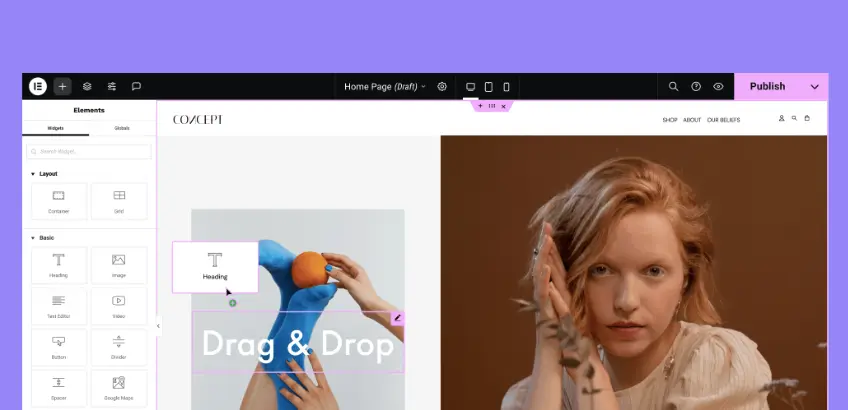
Elementor Pro is a leading WordPress page builder. The plugin offers various advanced features and widget to for creating dynamic and responsive websites. It has a drag-and-drop editor with an extensive widget library that allows you to design custom layouts for your web pages, headers, footers, blog post template, and more.
Among its features, Elementor Pro includes a popup builder that integrates seamlessly with its page design functionalities. This builder allows for the creation of highly customizable popups. It allows you control over triggers, animations, and targeting, providing a cohesive design experience across the site.
You can design popups from scratch or use pre-designed templates to ensure consistency with the site’s overall design.
Key features of Elementor Pro:
- Popup builder integrated with Elementor’s page design functionalities
- Highly customizable popups with control over triggers, animations, and targeting
- Pre-designed templates for quick setup
- Trigger options including on-click, scroll, time delay, and exit intent
- Advanced targeting based on page, device, and user behavior
- Seamless integration with Elementor’s design elements
- Responsive design ensures compatibility across devices
9. Popup Press

Popup Press is designed to create and manage responsive popups for various content types, including images, videos, and custom HTML. You can create slider and lightbox popups with the plugin to showcase content with attention-grabbing transition effects.
The plugin includes many advanced trigger options like automatic popups on page load, user clicks, timed delays, and more. As a result, you have the flexibility to decide how and when the popups should appear. Its advanced meta boxes enables you to insert multiple content types, such as contact forms, product descriptions, or alert messages, into popups.
Key features of Popup Press:
- Responsive popups for displaying images, videos, and custom HTML
- Slider popups for engaging media content
- Lightbox popups with transition effects
- Automatic popups on page load, click-triggered popups, and timed delays
- Advanced meta boxes for inserting multiple content types
- Customization options for popup appearance and behavior
- Responsive design optimized for various devices
10. Convert Pro

Convert Pro is a promising lead generation plugin. It offers a drag-and-drop editor by which you can create various opt-in forms, including modal popups, slide-ins, and fullscreen CTAs. The plugin integrates with 30+ email marketing services to simplify subscriber list management.
Convert Pro include many advanced triggers, like exit-intent detection, time delays, and scroll-based activation. This ensures that popups are displayed at the right moments to engage visitors. The plugin also supports A/B testing for allowing you to experiment with different designs and content to determine the most effective strategies.
Key features of Convert Pro:
- Drag-and-drop editor for creating customized popups
- Multiple opt-in form types (modal popups, slide-ins, and fullscreen CTAs)
- Many advanced triggers (exit-intent, time delays, scrolling, user inactivity)
- Device-specific popups with responsive designs
- A/B testing capabilities to optimize popup performance
- Integration with major email marketing services and CRM platforms
- Advanced analytics for real-time data tracking
- A robust library of pre-designed templates
11. Ninja Popups

Ninja Popups is a dedicated WordPress plugin focused on creating high-converting popups for lead generation and social engagement. It offers a range of professionally designed themes and integrates with popular email marketing services.
The plugin’s popup builder provides extensive customization options, including animations, colors, and display settings. Features like A/B testing and analytics allow users to optimize popup performance, ensuring that campaigns effectively contribute to the site’s marketing objectives.
Key features of Ninja Popups:
- Over 70 customizable popup themes with various animation effects
- Drag-and-drop visual editor for easy popup creation
- Multiple trigger options (time on page, scroll depth, user inactivity, and exit intent)
- Integration with popular email marketing services and social networks
- Anti-adblocker ensures popups are displayed even to users with ad blockers enabled
- Analytics and statistics to monitor popup performance
- Responsive design compatible with mobile devices
12. Icegram

Icegram is a feature-rich WordPress plugin that enables the creation of engaging opt-ins, calls-to-action, and notifications. It supports various campaign types, including popups, header and footer bars, and display notifications. All these provide flexibilities in audience engagement strategies.
The popup features in Icegram are designed for ease of use, with customizable templates and targeting options. You can set triggers based on time, scroll depth, or exit intent, ensuring that popups appear at moments when they are most likely to capture visitor interest and drive conversions.
Key features of Icegram:
- Create popups, header and footer bars, toast notifications, and slide-ins
- Customizable templates for various message styles
- Advanced targeting options (user behavior, location, device, and more)
- Trigger options (time delay, scrolling, exit intent, and user inactivity)
- Integration with popular email marketing services
- A/B testing and analytics for performance optimization
- Responsive design ensures compatibility across devices
13. Popup Maker

With the Popup Maker plugin, you can create various types of popups, including lightbox popups, slide-ins, and sticky bars. It integrates seamlessly with popular form plugins like Ninja Forms, Gravity Forms, and Contact Form 7. This enables the popups to open upon form submission or close when a form inside the popup is submitted.
The plugin offers multiple triggers for popup activation, such as automatic opening with optional delay, click-based triggers, and form submission. The premium version of the plugin includes some more exciting features, like exit-intent detection and scroll-triggered popups, so you can precisely target users.
Key features of Popup Maker:
- Multiple popup types, including lightbox popups, slide-ins, and sticky bars
- Integration with Ninja Forms, Gravity Forms, and Contact Form 7
- Various trigger options (optional delay, click-based triggers, and form submission)
- Premium features include exit-intent detection and scroll-triggered popups
- Precision targeting is based on factors like cart contents, user roles, and specific pages or posts
- Customization options for popup appearance and behavior
- Responsive design optimized for various devices
Conclusion
I hope you’ve enjoyed this detailed discussion on the best WordPress popup plugins. I’ve tried my best to shortlist only the most popular, trusted, and powerful popup-builder plugins in this post, considering their features, user ratings, and security reliability.
Each plugin mentioned here has the necessary strengths and capabilities for whether you need advanced targeting, stunning design options, or simple popup management. Now, it’s your turn to make the decision. Choose the plugin that best matches your budget, website goals, and audience needs.
Remember, a well-placed popup is not just a flashy box. It’s a proven tool for capturing attention, growing your email list, driving sales, and reducing cart abandonment. When used wisely, popups can turn casual visitors into loyal customers.

